<?xml version="1.0" encoding="utf-8"?><feed xmlns="http://www.w3.org/2005/Atom" ><generator uri="https://jekyllrb.com/" version="3.10.0">Jekyll</generator><link href="https://accessibility.civicactions.com/feed.xml" rel="self" type="application/atom+xml" /><link href="https://accessibility.civicactions.com/" rel="alternate" type="text/html" /><updated>2026-04-11T02:44:53+00:00</updated><id>https://accessibility.civicactions.com/feed.xml</id><title type="html">CivicActions Accessibility</title><subtitle>CivicActions Accessibility Site: A collection of resources about digital accessibility and how it aligns with open source, CivicTech and Digital Transformation.</subtitle><entry><title type="html">Prioritizing accessibility bugs for maximum impact</title><link href="https://accessibility.civicactions.com/posts/prioritizing-accessibility-bugs-for-maximum-impact" rel="alternate" type="text/html" title="Prioritizing accessibility bugs for maximum impact" /><published>2025-04-01T16:00:00+00:00</published><updated>2025-04-01T16:00:00+00:00</updated><id>https://accessibility.civicactions.com/posts/prioritizing-accessibility-bugs-for-maximum-impact</id><content type="html" xml:base="https://accessibility.civicactions.com/posts/prioritizing-accessibility-bugs-for-maximum-impact"><![CDATA[<p>By Jack Haas, Front End Engineer</p>

<p><img src="https://cdn-images-1.medium.com/max/1024/1*Ss7GsqaiWJYjA_4fkagEVQ.jpeg" alt="Close-up of a computer screen displaying lines of color-coded programming
code." /></p>

<p>Juggling competing priorities, tight deadlines, and endless iterations can
make it easy to deprioritize accessibility considerations. In our work, we've
seen how neglecting accessibility can lead to frustrating user experiences and
other consequences. That's why we decided to <a href="https://github.com/readme/guides/fix-accessibility-bugs">treat accessibility issues with
the same urgency as any other bug</a>.</p>

<p>Enter the <a href="https://accessibility.civicactions.com/guide/defect-priority">Accessibility Bug Classification
Matrix</a>, which
we created to help us quickly prioritize issues based on their impact. It
provides a clear framework for promptly identifying and addressing the most
critical accessibility barriers.</p>

<h3 id="features-of-our-bug-classification-matrix">Features of our bug classification matrix</h3>

<ul>
  <li>Adapted from industry best practices</li>
  <li>Covers a wide range of Web Content Accessibility Guidelines (WCAG) criteria</li>
  <li>Prioritizes issues based on user impact severity</li>
  <li>Provides clear action steps for each priority level</li>
</ul>

<h3 id="overview">Overview</h3>

<p>As our team grows and projects become more complex, we've realized the value
of having a centralized process and systemic approach to prioritizing
accessibility bugs as they are discovered.</p>

<p>Inspired by the <a href="https://github.com/dequelabs/axe-core/blob/develop/doc/issue_impact.md">impact classifications developed by accessibility experts at
Deque</a>, we adapted their framework to fit our
workflows and priorities. The result is a helpful tool that helps our teams
quickly assess and prioritize accessibility issues based on their true
severity and impact on users.</p>

<p><strong>This matrix isn't just for accessibility experts.</strong> We designed it to be a
resource for all team members, regardless of the accessibility knowledge. By
providing clear definitions and examples for each priority level, we're
empowering everyone on our team to make informed decisions about what needs to
happen when a bug is discovered.</p>

<p>It's important to note that this isn't meant to be a rigid, exhaustive list of
every possible accessibility issue. We recognize that the field of
accessibility is constantly changing, and new challenges emerge.</p>

<h3 id="accessibility-as-a-team-sport">Accessibility as a team sport</h3>

<p>We're fostering a culture of shared responsibility by making this resource
available to the whole team. Accessibility shouldn't be limited to a few
experts. Whether you're a project manager triaging a backlog of issues, a QA
team member doing release testing, or a designer who has noticed something odd
when reviewing how their work was implemented, our <a href="https://accessibility.civicactions.com/guide/defect-priority">Accessibility Bug
Classification Matrix</a> provides a common language and clear guidance.</p>

<h3 id="assessing-failure-levels-and-issue-priorities">Assessing failure levels and issue priorities</h3>

<p>We've divided the matrix into five levels, each with its own set of criteria
and corresponding remediation priority.</p>

<h3 id="level-1-page-level-interference-single-a-wcag-criteria">Level 1: Page-level interference (Single A WCAG criteria)</h3>

<p>Think of this as the <em>"drop everything and fix it now"</em> category. Issues at
this level are the most severe, as they fundamentally block users with
disabilities from accessing essential content or functionality.</p>

<p><img src="https://cdn-images-1.medium.com/max/696/0*lQ7GlQN8eGmycoN2" alt="Table of criteria showing page-level interference: the highest level of user
impact which should be addressed immediately." /> <em>See the full table of
criteria in the <a href="https://accessibility.civicactions.com/guide/defect-priority">Accessibility Bug Classification
Matrix</a>.</em></p>

<p>When we encounter issues like these, our priority is to address them
immediately, even if it means bypassing a regular release cycle. The user
impact is simply too high to defer resolving the issue.</p>

<h3 id="level-2-primary-component-failure">Level 2: Primary component failure</h3>

<p>Next up are issues that significantly degrade the user experience for key
components or content. While not as severe as Level 1 issues, these still
present substantial barriers for users with disabilities.</p>

<p><img src="https://cdn-images-1.medium.com/max/696/0*4xc76HeIcSsHNu2s" alt="Table of criteria showing primary component failure: a high level of user
impact which should be addressed in the next release." /> <em>See the full table of
criteria in the <a href="https://accessibility.civicactions.com/guide/defect-priority">Accessibility Bug Classification
Matrix</a>.</em></p>

<p>The goal is to address these level 2 issues in the next regular release cycle.
They're high priority but with a bit more flexibility (compared to Level 1).</p>

<h3 id="level-3-component-interference">Level 3: Component interference</h3>

<p>At this level, we're dealing with issues that, while not completely blocking
access, still present significant usability challenges for assistive
technology users.</p>

<p><img src="https://cdn-images-1.medium.com/max/696/0*oVWReMPvFkHYWcva" alt="Table of criteria showing component interference: a medium level of user
impact which should be addressed within the quarter." /> <em>See the full table of
criteria in the <a href="https://accessibility.civicactions.com/guide/defect-priority">Accessibility Bug Classification
Matrix</a>.</em></p>

<p>Our target for Level 3 issues is to resolve them within the current quarter as
part of regular backlog refinement.</p>

<h3 id="level-4-page-or-component-degradation">Level 4: Page or component degradation</h3>

<p>These issues, while still important to address, have a lower impact on overall
usability. They may hinder compliance or present minor annoyances but
typically have workarounds.</p>

<p><img src="https://cdn-images-1.medium.com/max/696/0*51OqVlaG9hi8AuPk" alt="Table of criteria showing page or component degradation: a low level of user
impact which should be addressed when doing related work." /> <em>See the full table of
criteria in the <a href="https://accessibility.civicactions.com/guide/defect-priority">Accessibility Bug Classification
Matrix</a>.</em></p>

<p>We prioritize these for remediation as we're doing related development work or
as time allows.</p>

<h3 id="level-5-missing-best-practices">Level 5: Missing best practices</h3>

<p>Finally, we have issues that might not be strictly related to compliance but
represent opportunities to enhance accessibility and user experience. For
these, we rely on ongoing accessibility education and awareness among our
teams to consistently apply best practices and bake these in from the start.</p>

<p><img src="https://cdn-images-1.medium.com/max/696/0*t738ZM2l0h5zXje6" alt="Table of criteria showing missing best practices: the lowest level of user
impact which should be addressed as time allows." /> <em>See the full table of
criteria in the <a href="https://accessibility.civicactions.com/guide/defect-priority">Accessibility Bug Classification
Matrix</a>.</em></p>

<p>By breaking issues down into clear, actionable levels, we can ensure that the
most impactful issues are addressed promptly while still being pragmatic about
making improvements.</p>

<h3 id="advancing-accessibility-one-bug-at-a-time">Advancing accessibility, one bug at a time</h3>

<p>Project realities like tight deadlines and limited resources often force teams
to make tough choices about where to focus their efforts. By using tools like
the <a href="https://accessibility.civicactions.com/guide/defect-priority">Accessibility Bug Classification
Matrix</a> and
developing a culture of responsibility, teams can make meaningful progress
without compromising other project goals. A clear, actionable framework lets
us be strategic about where to spend our time to provide the biggest impact.
The key is to approach accessibility pragmatically <em>and</em> as an ongoing
process.</p>

<p><img src="https://medium.com/_/stat?event=post.clientViewed&amp;referrerSource=full_rss&amp;postId=e365e0a40098" alt="" /></p>

<hr />

<p><a href="https://medium.com/civicactions/prioritizing-accessibility-bugs-for-maximum-impact-e365e0a40098">Prioritizing accessibility bugs for maximum
impact</a> was originally published in
<a href="https://medium.com/civicactions">CivicActions</a> on Medium, where people are
continuing the conversation by highlighting and responding to this story.</p>]]></content><author><name>civicactions</name></author><summary type="html"><![CDATA[By Jack Haas, Front End Engineer]]></summary></entry><entry><title type="html">Delivering Digital First: Turning 21st Century IDEA into Action</title><link href="https://accessibility.civicactions.com/posts/delivering-digital-first-turning-21st-century-idea-into-action" rel="alternate" type="text/html" title="Delivering Digital First: Turning 21st Century IDEA into Action" /><published>2024-01-31T16:00:00+00:00</published><updated>2024-01-31T16:00:00+00:00</updated><id>https://accessibility.civicactions.com/posts/delivering-digital-first-turning-21st-century-idea-into-action</id><content type="html" xml:base="https://accessibility.civicactions.com/posts/delivering-digital-first-turning-21st-century-idea-into-action"><![CDATA[<p>By <a href="https://www.linkedin.com/in/mgifford/">Mike Gifford</a> and Emily
Ryan</p>

<p><img src="https://cdn-images-1.medium.com/max/1024/1*Gjq0z86HnUQR33ezNnxFog.jpeg" alt="Capitol building with American flag" /></p>

<h3 id="what-21st-century-idea-means-to-civicactions">What 21st Century IDEA Means to CivicActions</h3>

<p>Our team has embraced many of the key elements of <a href="https://digital.gov/resources/delivering-digital-first-public-experience/">The 21st Century Integrated
Digital Experience Act (IDEA)</a>,
which became a US law 5 years ago (December 2018). This was a bipartisan act
to encourage government agencies to build a framework and requirements for a
digital-first public experience, with an emphasis on accessibility, building
mobile-friendly user experiences, digitizing services and forms, and improving
the overall customer experience.</p>

<p>The legislation was designed with specific recommendations for a variety of
senior executive agency roles including Chief Information Officers. At a high
level, the guidance was designed to push agencies and the overall
administration to modernize the federal government. Included in the IDEA act
is a handful of strategic goals calling on agencies to:</p>

<ul>
  <li>Modernize their websites (which includes being mobile-friendly)</li>
  <li>Digitize services and forms</li>
  <li>Transition to standardized and centralized shared services</li>
  <li>Improve overall customer experience (CX)</li>
</ul>

<p>Additionally, the Office of Management and Budget (OMB) Memo M-23–22,
<a href="https://web.archive.org/web/20231216185448/https://www.whitehouse.gov/omb/management/ofcio/delivering-a-digital-first-public-experience/">Delivering a Digital-First Public
Experience</a>, came out this past fall (September 2023),
which expanded on the 21st Century IDEA act. The OMB memo clarified what the
21st Century IDEA act meant by the concept of <em>modernization</em>. The OMB memo
affords greater insight into what OMB and the federal government expects
agencies to deliver to the public.</p>

<p>This OMB Memo gives specific mechanisms by which agencies should be improving
their CX. Specifically, agency sites should:</p>

<ul>
  <li>Provide a feedback mechanism for users to report satisfaction or dissatisfaction with each web page or piece of web content</li>
  <li>Test online content with the intended target audience before and after publishing</li>
  <li>Examine websites and digital services to ensure content is written and implemented so that Limited English Proficiency (LEP) users can meaningfully access those services</li>
</ul>

<p>CivicActions has extensive experience working within these strategic goals
found in the IDEA act and the OMB memo, and we have brought this expertise to
agencies such as the US Department of Veterans Affairs (VA), Centers for
Medicare and Medicaid Services (CMS), the National Science Foundation (NSF),
and the Department of Education (ED). The work that we do is accessible,
responsive, mobile performant, and frequently exceeds the requirements of
Section 508, thereby ensuring the solutions create the best customer
experience while adhering to the needs of the public.</p>

<h3 id="modernizing-websites">Modernizing websites</h3>

<p>We understand that a modern digital experience fully incorporates smartphones.
Our team works with our clients to build a good mobile first experience. We
know from the <a href="https://censusreporter.org/tables/B28005/">US Census data</a> that
millions of Americans do not have a desktop computer. Data from
Analytics.USA.gov shows that more than half of the traffic to the sites
monitored is coming from either iOS or Android users.</p>

<p>To ensure we're building the best mobile-first experience, CivicActions works
extensively with Drupal and the US Web Design System (USWDS). We maintain the
Drupal USWDS Theme, and also implement it for our clients. This allows us to
confidently build modern digital experiences for multiple devices, screen
sizes and assistive technology, through a proven mobile-first strategy. By
leveraging the USWDS federal design system and open source platforms such as
Drupal, we improve the customer experience (CX) of our clients' sites.</p>

<p>In addition, we bring content strategy, user research, and visual design into
our processes to ensure they meet the needs of the public and the agencies we
serve. Our practitioners are well-versed in using human-centered design (HCD)
approaches and we balance this with addressing the needs of each agency and
their goals. Finally, our focus on accessibility allows us to build sites that
are future compatible, providing an experience that works across all of the
public.</p>

<h3 id="digitizing-services-and-forms">Digitizing services and forms</h3>

<p>There is an ongoing challenge to digitize government services. Agencies are
struggling to move beyond legacy PDF forms. At CMS and VA, we have done
extensive work on building customized web forms. These forms follow best
practices, and provide a user-friendly interface for citizens to provide
information to the government. Such approaches also help to ensure information
gathering is done in an accessible and usable manner, creating time-saving
data collection methods for agencies and reducing mistakes and processing
time.</p>

<h3 id="transitioning-to-standardized-and-centralized-shared-services-including-open-source">Transitioning to standardized and centralized shared services (including open source)</h3>

<p>CivicActions has extensive experience in open source communities, like the
USWDS. We are connected into the USWDS community, and our teams contribute to
improving the USWDS framework by actively engaging with the community through
collaboration in GitHub and Slack as well as through annual conferences,
trainings, newsletters, podcasts, webinars and other opportunities. Where we
can, we bring our deep Drupal experience and solutions to our client's
challenges back into the USWDS. This is a critical part of seeing that we
continue to provide robust digital services in the future.</p>

<p>This work with Drupal supports the goal of future transitions to centralized
shared services. Building open source solutions with Drupal create structured
content which lends itself to standalone and/or federated systems. Content can
be published once, and blended into the pages of multiple sites, thus reducing
the cost of maintaining repetitive content. Governments around the world are
seeing the benefits of centralizing on mature open source technology like
Drupal.</p>

<p>Working with Drupal also provides us an advantage both in accessibility and
mobile support. Drupal has been built to exceed the needs of Section 508 for
both the public facing and author facing interfaces. With 25% of the
population having a disability, we know that authors also need accessible
interfaces. Because of our work in the Drupal community, we are able to engage
with global experts on a range of topics.</p>

<h3 id="improve-overall-customer-experience-cx">Improve overall customer experience (CX)</h3>

<p>As mentioned above, we have an experienced team with an understanding of user
research, content design and service design work.</p>

<p>CivicActions understands the need for user research and testing. Our human-
centered and data-driven design team works to align with the USWDS and the
specific design systems and style guides of our government clients.
CivicActions' content design team is also working to establish plain language
text that is easy to understand and more accessible to the average user.</p>

<p>We know people come to government websites in order to find information and we
work with our clients to build an experience that allows users to quickly find
what they need. The OMB's policy guidance (M-23–22) embraces the idea that
search is an important piece of a digital first public experience. It is
important that government pages are optimized for search engines, but also
that they have a meaningful internal search capacity. Our team has experience
customizing the search experience in Drupal for our clients. There is a lot of
customization available within Drupal, but we have also leveraged
<a href="https://search.gov/">Search.gov</a> services.</p>

<p>We are working with our clients to find ways to embed dynamic experience for
our users in their sites. We understand that government often requires users
to complete complex tasks and we continue to utilize best practices that align
to the IDEA act and the OMB's memo in order to simplify their workloads.</p>

<h3 id="accessibility-and-digital-first-public-experiences">Accessibility and Digital-First Public Experiences</h3>

<p>Finally, for the first time, per the OMB memo, agencies are directly
encouraged to do the following:</p>

<ul>
  <li>"Apply the most current Web Content Accessibility Guidelines (WCAG) published by the World Wide Web Consortium (W3C) to websites and web applications, where possible."</li>
  <li>"Include automated scanning, manual testing of websites, and usability testing with people with disabilities, as well as testing with users of adaptive technologies."</li>
  <li>"Incorporate the needs of individuals with disabilities into the design and development of websites and digital services, and should include individuals with disabilities in usability testing of new tools or features."</li>
</ul>

<p>The guidance from the OMB re-enforces the need for government agencies to
focus more on accessibility. The <a href="https://web.archive.org/web/20240604232050/https://assets.section508.gov/files/reports/2023%20Spring%20Section%20508%20Program%20Maturity%20Report%20-%20Executive%20Summary.pdf">Spring 2023 Section 508 Program Maturity
Report</a>,
demonstrated accessibility is not being consistently well managed across
government agencies. Citizens with disabilities should be able to expect that
they can engage with government agencies. This has been understood as a right
for citizens for over 30 years, yet it is still a challenge. The OMB Memo
provides very specific guidance on how agencies should be addressing
accessibility.</p>

<p>Accessibility is at the heart of CivicActions mission; our team is taking a
leadership role in Drupal's accessibility, and is engaged in several other
open source projects that focus on accessibility as well. Our staff includes
people with disabilities, and through our Champions Program and Accessibility
Onboarding, we ensure that this value is understood by every team member.</p>

<h3 id="where-we-are-going">Where We Are Going</h3>

<p>Our team is continuing to innovate in digital government. Our work with the
open source communities, like the USWDS &amp; Drupal, allow us to regularly engage
with other teams, projects, and agencies. By engaging with others, we learn
and contribute to the development of best practices. We can then bring these
approaches back to our clients, improving the experience for all. Reach out if
you are interested in learning more about our approach — we'd love the
opportunity to talk about what we can do together.</p>

<p><img src="https://medium.com/_/stat?event=post.clientViewed&amp;referrerSource=full_rss&amp;postId=f6aea8e3a6f0" alt="" /></p>

<hr />

<p><a href="https://medium.com/civicactions/delivering-digital-first-turning-21st-century-idea-into-action-f6aea8e3a6f0">Delivering Digital First: Turning 21st Century IDEA into
Action</a> was originally published in
<a href="https://medium.com/civicactions">CivicActions</a> on Medium, where people are
continuing the conversation by highlighting and responding to this story.</p>]]></content><author><name>civicactions</name></author><summary type="html"><![CDATA[By Mike Gifford and Emily Ryan]]></summary></entry><entry><title type="html">Measuring the Impact of Manual Accessibility Testing</title><link href="https://accessibility.civicactions.com/posts/measuring-the-impact-of-manual-accessibility-testing" rel="alternate" type="text/html" title="Measuring the Impact of Manual Accessibility Testing" /><published>2024-01-19T16:00:00+00:00</published><updated>2024-01-19T16:00:00+00:00</updated><id>https://accessibility.civicactions.com/posts/measuring-the-impact-of-manual-accessibility-testing</id><content type="html" xml:base="https://accessibility.civicactions.com/posts/measuring-the-impact-of-manual-accessibility-testing"><![CDATA[<p>By Maggie Wachs</p>

<p><img src="https://cdn-images-1.medium.com/max/1024/1*-OsVJ4EdFbrGjd9fM344OQ.jpeg" alt="a person types on a laptop" /></p>

<p>When we talk about testing websites for accessibility, one of the most
frequently cited statistics is that automated testing discovers
<a href="https://www.levelaccess.com/blog/automated-accessibility-testing-tools-how-much-do-scans-catch/">30%</a> to 60% of the errors we need to address. (Aside:
that discrepancy seems to be due to how you define the number of errors, <a href="https://www.deque.com/automated-accessibility-testing-coverage/">by
type or frequency</a>.) No matter which number is cited, this means a significant number
of accessibility violations, around 40–70%, still require an actual human user
to verify.</p>

<p>This past year, from November 2022 to now, the accessibility practice for the
Web Experience and Content Management Services (WECMS) team, which supports
the Centers for Medicare and Medicaid (CMS), has increased our manual testing
efforts. With all of this in mind, I thought it would be interesting to
quantify how much effort we spent verifying accessibility issues via automated
testing, manual testing, or a combination of both — especially as this relates
to concerns raised in the recently published <a href="https://www.section508.gov/manage/section-508-assessment/">Government-wide Section 508 Assessment</a>. A
few of the
<a href="https://www.section508.gov/manage/section-508-assessment/criteria-01/">criteria</a>
directly address manual testing efforts:</p>

<p>13/ If your agency uses a manual and/or hybrid ICT accessibility test
methodology for web content, which manual test methodology or methodologies
does your agency use?</p>

<p>47/ Indicate how often your agency conducts comprehensive manual conformance
validation testing for web content (internet and intranet) prior to deployment
to address all applicable Section 508 standards.</p>

<p>68/ How many public internet web pages were evaluated by a combination of both
automated and manual testing in the reporting period?</p>

<h3 id="assessment-methods">Assessment methods</h3>

<p>We can determine which form of testing — automated, manual, or both — was
required for our project's tickets by looking at the <a href="https://www.w3.org/TR/WCAG22/">Web Content
Accessibility Guidelines (WCAG) success
criteria</a> that apply to each issue/ticket. A
very small number of WCAG criteria can be verified by automated testing alone;
the vast majority require some degree of manual review. For example, an ARIA
label that satisfies <a href="https://www.w3.org/TR/WCAG22/#info-and-relationships">1.3.1 Info and
Relationships</a> can be
detected by an automated test, but the value must be reviewed manually by a
person to confirm that it makes sense.</p>

<p>First, I added labels to all accessibility issues in Jira resolved between
November 2022 and 2023 that reference the relevant WCAG criteria (i.e.,
"WCAG-2.5.3"). While this exercise was somewhat time-consuming —we logged
around 300 accessibility issues total across 7 websites — it was well worth
the time as it will greatly simplify updates to our upcoming annual reporting
process. So, win-win.</p>

<p>Then I mapped the testing method to each criterion in this matrix (see
Appendix A: Required testing methods by WCAG criteria), based on a <a href="https://blog.usablenet.com/automated-wcag-testing-is-not-enough-for-web-accessibility-ada-compliance">similar
matrix published by Usablenet</a> and the <a href="https://github.com/dequelabs/axe-core/blob/develop/doc/rule-descriptions.md">axe-core
rule definitions</a>. Each axe-core rule is assigned an Issue Type, which notes
whether a rule can result in failure (a clear accessibility violation), or if
it needs review, which <a href="https://docs.deque.com/devtools-html/4.0.0/en/needs-review-incomplete">Deque defines as</a>, "there may or not be an accessibility
issue and more investigation is required." If an axe-core rule's issue type
includes "needs review," that rule, and by extension the WCAG criteria tested,
may require manual testing.</p>

<h3 id="results">Results</h3>

<p>We logged around 300 accessibility issues total, however only <strong>230 tickets</strong>
represented WCAG violations (the rest related to best practices or discovery).
Of those:</p>

<ul>
  <li><strong>146</strong> required both automated and manual testing</li>
  <li><strong>72</strong> could be verified with manual tests only</li>
  <li><strong>12</strong> could be verified with automated tests only</li>
</ul>

<p><img src="https://cdn-images-1.medium.com/max/1024/1*UbQcDJBrMWtb4wgBqxv2gA.jpeg" alt="Pie chart with accessibility issues by testing method, Manual tests
(31.3%), Automated tests (5.2%) and manual + automated tests
(63.5%)" /></p>

<h3 id="summary">Summary</h3>

<p>The WECMS team made great strides with manual testing in 2023, and testing in
general:</p>

<ul>
  <li>Most of the WCAG violations we fixed were verified by a person using a keyboard or screen reader, and/or by considering context, meaning, purpose, logical placement, and allowed exceptions.</li>
  <li>Code written by our engineers consistently has few objective errors that can be discovered with automated testing. I can vouch for our design and development teams using semantic markup, including text labels, checking color values, and overall creating templates and experiences that will pass automated checks.</li>
</ul>

<p>This exercise showed that manual testing is not only necessary, it accounts
for most of the time we spend verifying accessibility conformance for the
WECMS websites. We can now use these results to inform how much effort we put
toward, for example, team training on screen reader use, and it can fine-tune
how we prioritize time and resources for remediating issues.</p>

<p>It's important to remember that while we're growing more proficient with
manual testing tools and methods, usability testing with disabled people — the
true experts when it comes to assessing a website's accessibility — should
continue to be a top goal for our accessibility practice.</p>

<p><img src="https://medium.com/_/stat?event=post.clientViewed&amp;referrerSource=full_rss&amp;postId=e052a58d9d16" alt="" /></p>

<hr />

<p><a href="https://medium.com/civicactions/measuring-the-impact-of-manual-accessibility-testing-e052a58d9d16">Measuring the Impact of Manual Accessibility
Testing</a> was originally published in
<a href="https://medium.com/civicactions">CivicActions</a> on Medium, where people are
continuing the conversation by highlighting and responding to this story.</p>]]></content><author><name>civicactions</name></author><summary type="html"><![CDATA[By Maggie Wachs]]></summary></entry><entry><title type="html">How We Helped a Government Website Achieve Zero Accessibility Errors*</title><link href="https://accessibility.civicactions.com/posts/how-we-helped-a-government-website-achieve-zero-accessibility-errors" rel="alternate" type="text/html" title="How We Helped a Government Website Achieve Zero Accessibility Errors*" /><published>2023-12-08T16:00:00+00:00</published><updated>2023-12-08T16:00:00+00:00</updated><id>https://accessibility.civicactions.com/posts/how-we-helped-a-government-website-achieve-zero-accessibility-errors</id><content type="html" xml:base="https://accessibility.civicactions.com/posts/how-we-helped-a-government-website-achieve-zero-accessibility-errors"><![CDATA[<p><img src="https://cdn-images-1.medium.com/max/1024/1*qqsBbdQRCiCDw8Kr5GKu9w.jpeg" alt="Blue abstract fiberoptics" /></p>

<p>At CivicActions we have
<a href="https://accessibility.civicactions.com/posts/CivicActions-Accessibility-Pledge">pledged</a> to advance our accessibility maturity to provide
critical human services to as many people as possible so that they can get the
help they need, as well allowing service providers to readily engage with
their users. The commitment here is twofold (at least). Firstly, allow users
of the site to not only access information the site provides, but to make that
process as easy as possible regardless of their accessibility challenges.
Secondly, allowing service providers to reach as many users as possible while
keeping those users engaged, and keeping the site first and foremost in the
users' minds for subsequent times they need information.</p>

<p>Reaching this higher level of maturity includes, but is not limited to:</p>

<ul>
  <li>Integrating the highest standards of testing into our continuous integration processes</li>
  <li>Automating site-wide testing and historical analysis</li>
  <li>Implementing site-wide rankings and improvement targets into the agile process</li>
  <li>Include manual testing to catch issues that automated testing cannot evaluate</li>
</ul>

<p>To that, the team that works for the Defense Security Cooperation Agency
(DSCA) supporting the Department of Defense (DoD) Regional Centers has spent
the last year (2022 Q4 to 2023 Q3) monitoring accessibility issues on the
platform and working to improve them. We use browser extensions, WAVE and axe
DevTools to check for issues on individual features we work on. To capture
issues across many pages, we have set up Pa11y CI running axe-core and HTMLCS
and Cypress with cypress-axe plugin. Axe-core is an industry standard
automated accessibility testing engine. The tools are all run automatically
using GitLab CI/CD pipelines.</p>

<p>Our efforts to improve accessibility have not produced any reported site
disturbances, slow-downs, or errors; the feedback from our users has been
overwhelmingly positive:</p>

<p><em>"As far as accessibility goes, this system is way ahead of other DoD systems
that I've used." —</em> Dwayne Wood Ed.D., Curriculum &amp; Training Developer, Ted
Stevens Center for Arctic Security Studies</p>

<p>While it is always nice to receive kudos, praise like this makes us aware that
accessibility is also important to our stakeholders, and that our efforts have
not gone unnoticed.</p>

<h3 id="issues-explored-and-urls-scanned">Issues explored and URLs Scanned</h3>

<p>The team's goal was to, at the minimum, attain Section 508 and WCAG 2.0 AA
standards and our plan is to work on reported issues in quarterly epics (an
epic is a large chunk of work that is segmented into smaller tasks, used to
organize tasks and create hierarchy in the development process). While
automation only catches about 33% — 50% issues, those are still important to
fix. Following the <a href="https://github.com/dequelabs/axe-core/blob/develop/doc/issue_impact.md">axe issue impact</a>, the team focused first on critical and
serious issues. The team also focused on moderate/minor issues that are common
to many pages where possible.</p>

<p>We configured each tool to assess a set of URLs with our Pa11y scans. We
focused on the URLs that are the main pages and also represent common
features. With Cypress-axe the focus also includes URLs for organization
manager and member roles. The URLs cover:</p>

<ul>
  <li>Home Page</li>
  <li>Login</li>
  <li>Organization Management</li>
  <li>Support Form</li>
  <li>Policies</li>
  <li>Organization/Groups/Courses</li>
  <li>Account Management</li>
  <li>Search</li>
  <li>Guide</li>
  <li>404 Page</li>
</ul>

<p>The common features are:</p>

<ul>
  <li>Headers</li>
  <li>Links</li>
  <li>Tabs</li>
  <li>Buttons</li>
  <li>Breadcrumbs</li>
  <li>Images</li>
  <li>Text/Link Colors</li>
  <li>Form Fields</li>
  <li>Various Text Displays</li>
  <li>Tables</li>
</ul>

<h3 id="reduction-of-issues-over-each-quarter">Reduction of issues over each quarter</h3>

<p>Here is our progression as we started fixing the system's accessibility issues
as reported by the two different tools.</p>

<h3 id="pa11y-ci">Pa11y-CI</h3>

<p>Run against 15 production URLs:</p>

<ul>
  <li>Start of Q1, number of issues: 118</li>
  <li>Start of Q2, number of issues: 66</li>
  <li>Start of Q3, number of issues: 12</li>
  <li>As of August 15th: 0*</li>
</ul>

<h3 id="cypress">Cypress</h3>

<p>Run against 33 URLs (the additional URLs are tested with authenticated users
who have different roles):</p>

<ul>
  <li>Start of Q1, number of issues: 156</li>
  <li>Start of Q2, number of issues: 68</li>
  <li>Start of Q3, number of issues: 33</li>
  <li>Start of Q4, number of issues: 5</li>
  <li>As of Oct 5th: 0*</li>
</ul>

<h3 id="additional-criteria">Additional Criteria</h3>

<p>In our analysis of accessibility issues reported by the tools and our efforts
to fix them, we identified the following issues that went unaddressed:</p>

<ul>
  <li><a href="https://dequeuniversity.com/rules/axe/4.6/color-contrast">Color-contrast</a>: we skipped this because the system theme uses background images in CSS. So we get a lot of reports of color contrast reports requiring manual review from both tools.</li>
  <li><a href="https://dequeuniversity.com/rules/axe/4.6/nested-interactive">Nested-interactive</a>: we skipped this because of the use of jQuery UI tabs that rely on nested implementation to work. We did confirm manually that the tabs are accessible with a keyboard.</li>
  <li><a href="https://dequeuniversity.com/rules/axe/4.7/aria-required-children?application=AxeChrome">Aria-required-children</a>: similar to the previous one, jQuery UI accordions creates HTML elements with non-standard aria roles, throwing this error. We did confirm manually that the tabs are accessible with a keyboard.</li>
  <li><a href="https://dequeuniversity.com/rules/axe/4.7/duplicate-id?application=AxeChrome">Duplicate-ID</a>, <a href="https://dequeuniversity.com/rules/axe/4.7/duplicate-id-aria?application=AxeChrome">duplicate-id-aria</a>: we skipped these on a few pages because in some cases making the ids unique caused existing features to not work as expected.</li>
  <li><a href="https://dequeuniversity.com/rules/axe/4.7/heading-order?application=AxeChrome">Heading-order</a>: in a future ticket, we will tackle adjusting header order for multiple pages (see challenges for details).</li>
  <li>We also skipped checking accessibility of third-party widgets such as Google Translate as we cannot control the HTML they render.</li>
</ul>

<h3 id="challenges">Challenges</h3>

<p><strong>Challenge</strong> : CSS used across multiple element types: changing the element
to be accessibility compliant sometimes means updating the CSS, which in turns
breaks another element sharing that CSS styling.</p>

<p><strong>Possible solution(s)</strong> : Create smaller CSS "classes" so that elements
which need modification can have their CSS attributes updated with minimal
effects on other elements. Elements that need a number of CSS attributes can
implement groups of these smaller CSS classes. If, while fixing an
accessibility issue, a conflict arises because two or more elements are
sharing a class, we can create another small CSS class to swap out for the
pre-existing class to resolve the conflict.</p>

<p><strong>Challenge</strong> : When attempting to have our header hierarchy meet
accessibility standards, we found out header elements were tightly coupled
with CSS and JavaScript functionality. For this reason, it is not as simple as
swapping out h2 for h3, because the combination of styling and JavaScript
leads to misalignment, or broken functionality i.e. a menu heading that does
not open when clicked.</p>

<p><strong>Possible solution(s)</strong> : This is similar to the CSS challenge. Break down
the CSS/JavaScript so that the header elements share as few attributes as
possible.</p>

<p><strong>Challenge</strong> : Using an image and teaser text within a link to an article
caused accessibility issues. In this case the image, which has its own
descriptor text when a user hovers, causes a context error since it is in the
scope of the link, but does not describe to what it is being linked.</p>

<p><strong>Possible solution(s):</strong> To rectify this issue, we decided to create a
teaser card element in which the image and teaser text would reside and the
card containing those elements would provide context to the linked page.</p>

<p><strong>Challenge</strong> : Color contrast adjustments to meet WCAG AA standards is not
problematic, however getting to WCAG AAA standards will be a bit more
challenging as the range of colors to achieve the correct contrast ratio is a
bit more narrow, and one must also consider the link color contrasts in
addition to the background color, and foreground color contrasts.</p>

<p><strong>Possible solution(s)</strong> : If you already have a comprehensive style guide,
then this should not be too much of an issue. However, if you don't, then the
creation of a style guide would go a long way to helping to keep color
contrasts meeting accessibility standards. Also, it's not enough for the guide
to have one foreground color A contrasts well with one background color B, but
maybe include a range of colors that are acceptable for the site.</p>

<p><strong>Challenge</strong> : Dealing with third party issues. For example, when trying to
clean up the AXE accessibility tool error <strong>attribute IDs must be unique</strong> ,
we found that the methodology the <strong>Date</strong> module uses to construct the
wrapper IDs was the cause of the issue.</p>

<p><strong>Possible solution(s)</strong> : Making changes to third party software can be
problematic in that a modification can solve your problem, but runs the risk
of causing problems for someone else. The recommended course of action is to
create a patch file which solves your problem, and share the patch with the
overall community for review and testing.</p>

<h3 id="manual-testing-and-fixes">Manual testing and fixes</h3>

<p>In our progress to fix accessibility issues, we also did manual testing using
a keyboard and found certain elements of the site didn't work. These are
issues that automated tests will not catch. We fixed those as well to improve
the keyboard navigability of the platform.</p>

<h3 id="whats-next">What's next</h3>

<p>Overall, we were able to improve the accessibility of our site through</p>

<ul>
  <li>Having guidelines to direct our efforts</li>
  <li>Making a plan based on how effective our implementations would be</li>
  <li>Making use of automated testing</li>
  <li>Integrating manual testing/checking with the automated testing</li>
  <li>Keeping an eye on which issues could put on the back burner</li>
</ul>

<p>However, accessibility is not a one and done aspect of any project. It
requires constant vigilance. To that end, we are looking forward to continuing
our work with these high-level to-do items:</p>

<ul>
  <li>Add more URLs to each list. Cover more areas of the site that might not be covered in the examples above.</li>
  <li>Share results of the Pa11y CI with users who primarily provide content, like our organization managers. They can use the results to make sure they are not introducing accessibility issues with their content.</li>
  <li>Cypress accessibility tests run whenever we push code changes; we are waiting to get down to a few remaining issues to switch it to running automatically instead of on demand. We will also switch the pipeline from allowing failure to requiring the pipeline to pass, this should prevent accessibility issues from being introduced whenever we push code changes.</li>
  <li>Add more dynamic element testing like menus and interactive components. This is to make sure when a menu is open or some element is interacted with that the results are also accessible. This can be accomplished with both Pa11y-CI and Cypress testing.</li>
</ul>

<p>In conclusion, while our process might not be appropriate for every use case,
however, it is important for everyone to put some effort into increasing the
accessibility of their site. Our efforts have not only increased the
accessibility of the government site we support, but has also made us more
cognizant of accessibility challenges. This awareness contributes to the
raising of the best practices bar for our developers and other members of our
team. In addition to the success of incorporating accessibility into our
coding and design process, success can also be measured by what we are not
hearing; namely bug reports and complaints regarding usability. In that
regard, to date, our efforts have proven to be successful.</p>

<p>* <em>Zero accessibility automated issues doesn't mean the site is without barriers, but it does mean 30% to 50% of potential issues on the URLs we test are clear.</em></p>

<p><img src="https://medium.com/_/stat?event=post.clientViewed&amp;referrerSource=full_rss&amp;postId=38e7cf3cc52a" alt="" /></p>

<hr />

<p><a href="https://medium.com/civicactions/how-we-helped-a-government-website-achieve-zero-accessibility-errors-38e7cf3cc52a">How We Helped a Government Website Achieve Zero Accessibility
Errors*</a> was originally published in
<a href="https://medium.com/civicactions">CivicActions</a> on Medium, where people are
continuing the conversation by highlighting and responding to this story.</p>]]></content><author><name>civicactions</name></author><summary type="html"><![CDATA[]]></summary></entry><entry><title type="html">Five reasons to get excited about governmentwide Section 508 assessment criteria</title><link href="https://accessibility.civicactions.com/posts/five-reasons-to-get-excited-about-governmentwide-section-508-assessment-criteria" rel="alternate" type="text/html" title="Five reasons to get excited about governmentwide Section 508 assessment criteria" /><published>2023-08-08T18:00:00+00:00</published><updated>2023-08-08T18:00:00+00:00</updated><id>https://accessibility.civicactions.com/posts/five-reasons-to-get-excited-about-governmentwide-section-508-assessment-criteria</id><content type="html" xml:base="https://accessibility.civicactions.com/posts/five-reasons-to-get-excited-about-governmentwide-section-508-assessment-criteria"><![CDATA[<h2 id="five-reasons-to-get-excited-about-governmentwide-section-508-assessment-criteria">Five reasons to get excited about governmentwide Section 508 assessment criteria</h2>

<p>Mike had this <a href="https://federalnewsnetwork.com/commentary/2023/08/five-reasons-to-get-excited-about-governmentwide-section-508-assessment-criteria/">article published with the Federal News Network</a> celebrating the approach taken by 
the <a href="https://www.whitehouse.gov/omb/">Office of Management and Budget</a>, <a href="https://www.justice.gov">U.S. Department of Justice</a> and the <a href="https://www.gsa.gov/">GSA</a> to collect accessibility information from government agencies.</p>

<p>Seeing results every six months will also be so important to be able to track progress on meeting the Seciton 508 goals, but also achieving the government's Diversity, Equity, Inclusion and Accessibility (DEIA) goals.</p>]]></content><author><name>mike-gifford</name></author><summary type="html"><![CDATA[Five reasons to get excited about governmentwide Section 508 assessment criteria]]></summary></entry><entry><title type="html">Treat accessibility issues as bugs, not feature requests</title><link href="https://accessibility.civicactions.com/posts/fix-accessibility-bugs" rel="alternate" type="text/html" title="Treat accessibility issues as bugs, not feature requests" /><published>2023-08-08T16:00:00+00:00</published><updated>2023-08-08T16:00:00+00:00</updated><id>https://accessibility.civicactions.com/posts/fix-accessibility-bugs</id><content type="html" xml:base="https://accessibility.civicactions.com/posts/fix-accessibility-bugs"><![CDATA[<h2 id="treat-accessibility-issues-as-bugs-not-feature-requests">Treat accessibility issues as bugs, not feature requests</h2>

<p>Mike had this <a href="https://github.com/readme/guides/fix-accessibility-bugs">article published with GitHub's ReadME Project</a> looking back over what worked with Drupal, and how it could apply to more open source projects.</p>

<p>Drupal is probably the most accessible content management system in the world. This didn't happen over night, and it has taken the input of hundreds of people. Still there are other software communities that can learn from this to make their code more accessible.</p>]]></content><author><name>mike-gifford</name></author><summary type="html"><![CDATA[Treat accessibility issues as bugs, not feature requests]]></summary></entry><entry><title type="html">How OMB can improve .gov accessibility</title><link href="https://accessibility.civicactions.com/posts/how-omb-can-improve-gov-accessibility" rel="alternate" type="text/html" title="How OMB can improve .gov accessibility" /><published>2023-05-05T16:00:00+00:00</published><updated>2023-05-05T16:00:00+00:00</updated><id>https://accessibility.civicactions.com/posts/how-omb-can-improve-gov-accessibility</id><content type="html" xml:base="https://accessibility.civicactions.com/posts/how-omb-can-improve-gov-accessibility"><![CDATA[<h2 id="how-omb-can-improve-gov-accessibility">How OMB can improve .gov accessibility</h2>

<p>Mike had this <a href="https://federalnewsnetwork.com/commentary/2023/05/how-omb-can-improve-gov-accessibility/">article published with the Federal News Network</a> on how the USA government can learn from best practices adopted in Europe with the Web Accessibility Directive.</p>

<p>There is such a great opportunity to learn from and build on the work done by the European Commission. Right now they are leading the world in digital accessibility.</p>]]></content><author><name>mike-gifford</name></author><summary type="html"><![CDATA[How OMB can improve .gov accessibility]]></summary></entry><entry><title type="html">Daniel Mundra: Diving into Drupal</title><link href="https://accessibility.civicactions.com/posts/daniel-mundra-diving-into-drupal" rel="alternate" type="text/html" title="Daniel Mundra: Diving into Drupal" /><published>2023-04-10T16:00:00+00:00</published><updated>2023-04-10T16:00:00+00:00</updated><id>https://accessibility.civicactions.com/posts/daniel-mundra-diving-into-drupal</id><content type="html" xml:base="https://accessibility.civicactions.com/posts/daniel-mundra-diving-into-drupal"><![CDATA[<p><img src="https://cdn-
images-1.medium.com/max/1024/1*9vNRg9HsEJ03hxflXvPxJw.jpeg" alt="Daniel Mundra stands in nature" /></p>

<p><em>We spoke to CivicActioner Daniel Mundra, Associate Director of Drupal, about
the benefits of Drupal, community contributions, and why working at
CivicActions has been so rewarding for him . He is among a team of 60+ Drupal
engineers with nearly 20 Acquia certifications and 20+ edX a11y
(Accessibility) certifications.</em></p>

<p><strong>CivicActions is known for our Drupal expertise. To you, why is Drupal such
an important tool in the work that we do for our government clients?</strong></p>

<p>Drupal is a complex tool but it is the best tool to help deliver complex
concepts for our government clients. Drupal also delivers for our clients
while still being free, open source, having a growing community, and also not
afraid to change/adapt. I don't believe other similar products could check all
those boxes.</p>

<p>I have been working with Drupal for 12+ years, first with Drupal version 6 and
now with 10. Since my early days, Drupal has been a veritable Swiss army knife
for web development. It helped me deliver a lot of value to users in a quick
amount of time. Earlier I would produce many sites with a lot of modules but
not consider the maintenance costs, reliability you get with writing tests,
giving back to the community, and so on. It left my clients with a functional
site but a maintenance burden. Nowadays I focus more on contributing back,
writing more tests, reducing maintenance burden and thinking of long term
solutions than quicker output of sites. Just like how the Drupal platform and
community has evolved, so have I. Drupal has given me the space to do that and
I am grateful for that.</p>

<p><strong>What are some community contributions to Drupal from your team that you are
especially proud of?</strong></p>

<p>CivicActions contributes quite a bit to Drupal. Last year CivicActions was
credited with contributing 90+ contributions and that is only growing. I am
particularly proud of the modules we are adding to the community, like <a href="https://medium.com/civicactions/improving-
centers-for-medicare-and-medicaid-services-cms-through-drupal-contributions-
adb4f91f6095">Media
Link Enhancements (from Cameron Prince), Google Programmable Search JSON API
(from Timo Zura and Sam Lerner)</a>, and recently Content Model Documentation (from Steve Wirt).</p>

<p><strong>You are very passionate about accessibility — why is accessibility so
important to you and how do you work to make projects more accessible at
CivicActions?</strong></p>

<p>Accessibility is important to me because to truly be human centered we have to
make technology accessible to all. The primary ways I work to make projects
more accessible is by first building from the beginning with accessibility in
mind. The second way is to add layers of accessibility testing to ensure the
site remains accessible. Layers like automated testing, manual testing with
keyboards/screen readers, and testing with disabled users (when possible).
Accessibility is a long term commitment and I can say that at CivicActions we
are all contributing to that and we are making a difference.</p>

<p><strong>What initially drew you to a career in civic tech, particularly at
CivicActions?</strong></p>

<p>After spending 10 years working in higher education, in particular as an in-
house developer for the University of Oregon, I wanted a change. As the
university was going away from in-house development, I wanted to continue
growing my skills while still supporting similar mission-driven organizations.
I found both at CivicActions.</p>

<p><strong>What is the most rewarding part of your job?</strong></p>

<p>Being able to give back to the community and also take part in the company
outside of the project. I am an associate director now but I wouldn't have
been able to reach that role without the support of everyone at CivicActions.
They made space for me to take part in company activities like OKRs, guidebook
updates, accessibility practice area, and so on. I am successful because of
the culture of the team to make space and make most parts of the company
accessible to discussion, debate and continuous improvement.</p>

<p><strong>Any advice for someone looking to follow a similar career trajectory?</strong></p>

<p>Ask questions and get involved where you can, either at the company you work
for or in your local community. Find that company and community that energizes
you and bring your whole self to them.</p>

<p><strong>On a lighter note, what is a fun fact that people may not know about you?</strong></p>

<p>I like statistics so much that for 3 years I was the official statistician for
the Oregon Cricket League. Lots of data entry and review but I was able to see
how local players and teams evolved.</p>

<p><img src="https://medium.com/_/stat?event=post.clientViewed&amp;referrerSource=full_rss&amp;postId=4a63bf99996b" alt="" /></p>

<hr />

<p><a href="https://medium.com/civicactions/daniel-
mundra-diving-into-drupal-4a63bf99996b">Daniel Mundra: Diving into Drupal</a> was originally published in
<a href="https://medium.com/civicactions">CivicActions</a> on Medium, where people are
continuing the conversation by highlighting and responding to this story.</p>]]></content><author><name>civicactions</name></author><summary type="html"><![CDATA[]]></summary></entry><entry><title type="html">Helping disabled Veterans Check-In: Designing an Accessibility Map</title><link href="https://accessibility.civicactions.com/posts/helping-disabled-veterans-check-in-designing-an-accessibility-map" rel="alternate" type="text/html" title="Helping disabled Veterans Check-In: Designing an Accessibility Map" /><published>2023-04-06T16:00:00+00:00</published><updated>2023-04-06T16:00:00+00:00</updated><id>https://accessibility.civicactions.com/posts/helping-disabled-veterans-check-in-designing-an-accessibility-map</id><content type="html" xml:base="https://accessibility.civicactions.com/posts/helping-disabled-veterans-check-in-designing-an-accessibility-map"><![CDATA[<p><em>A note on language: We're using both people-first language ("a person with a
disability") and identity-first language ("disabled person"). We recognize
both are valid and advocated for within the disability community.</em></p>

<p>"We lost our vision due to our service…my vision gets blurry," says a Veteran
over Zoom during a user research session.</p>

<p>We were testing new designs for a web-based app helping Veterans check into a
medical appointment.</p>

<p>This Veteran's experience is not uncommon: about 30% of Veterans live with a
disability (but that number is likely much higher due to military culture).
Almost 7,000 Veterans become newly blind or visually impaired every year. And
disabilities can vary in type and severity — the most common of which include
hearing loss, post-traumatic stress disorder (PTSD), scars, back and neck
pain, and migraines.</p>

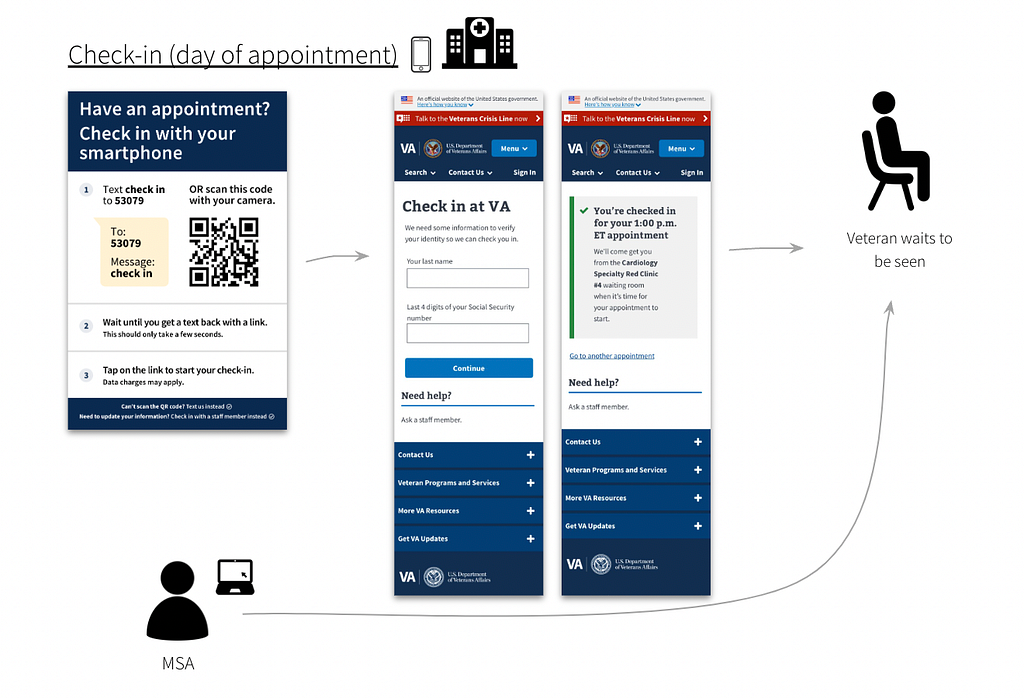
<p><img src="https://cdn-
images-1.medium.com/max/1024/1*3DFURXlCIC3EfrBXczqkEQ.png" alt="Summary of check-in process on day of appointment: 1) A poster titled 'Have
an appointment? Check in with your smartphone' is placed in the facility. The
Veteran scans the QR code or texts '5309' to check into their appointment
using their phone 2) A page titled 'Check-in'. 3) A page titled ' You've
checked-in for your 1pmET appointment'. 4) An icon of the Medical Support
Assistant (MSA) who receives the check-in notification. 5) An icon of the
Veteran waiting to be seen." /> <em>Figure 1: A few
days before an appointment, a Veteran receives an SMS text with a link to
start pre-check-in. After selecting the link, the Veteran sees the login page
(first image). When they complete pre-check-in, they see the submission page
(second image).</em><img src="https://cdn-
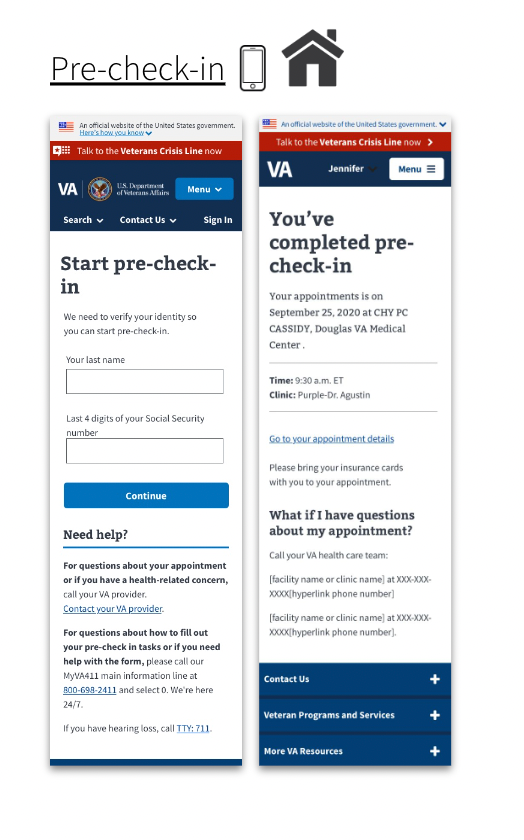
images-1.medium.com/max/524/1*mhjC0hkWfTbpQso6YVuNZg.png" alt="Example pages of pre-check-in app: 1) A login page titled
Start pre-check-in for the Veteran to enter their last name and last 4 digits
of their social security number. 2) A page titled Your pre-check-in is
complete appears, which includes a summary of the upcoming appointment (date,
time and location)." /> <em>Figure 2: When the
Veteran arrives on the day of their appointment, a poster with instructions to
check-in is placed in the facility. The Veteran scans the QR code or texts
'5309' to check into their appointment using their phone. The Medical Support
Assistant (MSA) receives a notification that the Veteran has checked-in to
their appointment. The Veteran waits until called in.</em></p>

<h3 id="checking-into-a-medical-appointment-with-a-smartphone-has-barriers">Checking into a medical appointment with a smartphone has barriers</h3>

<p>For example, it requires a Veteran to:</p>

<ul>
  <li>Own a phone (or have access to one)</li>
  <li>See the check-in poster at the facility</li>
  <li>Have reasonable tech-savviness to use SMS or a QR code</li>
  <li>Understand the steps within a reasonably short time-frame (which can be difficult for some Veterans with cognitive disability or PTSD)</li>
</ul>

<blockquote>
  <p>We wanted to design digital and non-digital solutions that helped make it
more usable for disabled Veterans to check into medical appointments.</p>
</blockquote>

<p>But we had a lot of questions.</p>

<ul>
  <li>Are we able to design for the range of types and severity of disabilities?</li>
  <li>Would some solutions only benefit some Veterans, while introducing barriers to others?</li>
  <li>How do we decide on those trade-offs?</li>
</ul>

<h3 id="we-created-an-accessibility-use-case-map">We created an Accessibility Use Case Map</h3>

<p>An accessibility use case map is a framework to evaluate proposed solutions
across multiple different types of disabilities affecting Veterans. We
considered both digital and non-digital solutions for each phase of the check-
in process.</p>

<h4 id="a-spreadsheet-makes-it-accessible">A spreadsheet makes it accessible</h4>

<p>As we note later in the article, we worked with an accessibility specialist
who uses a screen-reader. We chose to design the map in a spreadsheet. This
made it easy for our colleague to offer feedback.</p>

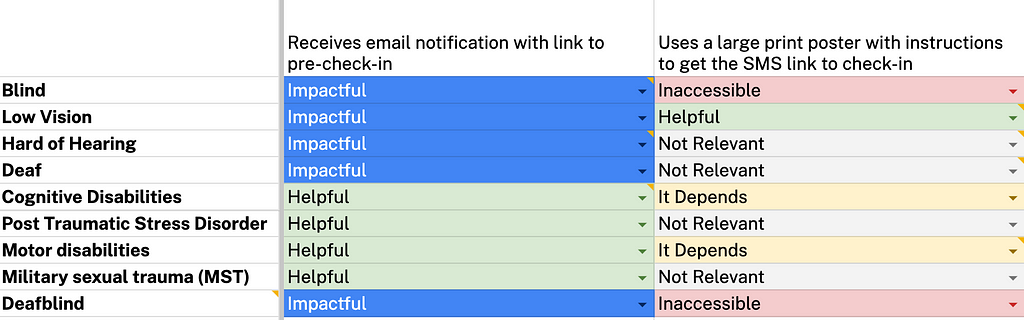
<p><img src="https://cdn-
images-1.medium.com/max/1024/1*xmkO7Ni9XiAQx7kzofTTVw.png" alt="Example of accessibility use case map in a spreadsheet. Solutions are listed
along the x-axis: Receives email notification with link to check-in and Uses a
large-print poster with instructions to get the SMS link on how to check-in.
All nine disabilities are listed on the y-axis: blind, low vision, hard of
hearing, deaf, cognitive disabilities, post-traumatic stress disorder, motor
disabilities, military sexual trauma. Each solution is assessed for degree of
impact, which we discuss later." /> <em>Figure 3: Example
of accessibility use case map. Solutions are indicated on the x-axis. All nine
disabilities are listed on the y-axis. Each solution is assessed for degree of
impact: impactful, helpful, it depends, not relevant, and inaccessible. This
criteria is discussed later in this article.</em></p>

<blockquote>
  <p>We wanted our map to help prioritize solutions that maximized benefits for
Veterans living with a variety of disabilities, while minimizing the chances
of introducing barriers.</p>
</blockquote>

<p>Here's how we created the accessibility use case map.</p>

<h3 id="step-1-developed-proto-personas-for-each-type-of-disability">Step 1: Developed proto-personas for each type of disability</h3>

<p>We chose nine of the most common types of disabilities reported by Veterans:</p>

<ul>
  <li>Blindness</li>
  <li>Low vision</li>
  <li>Hard of hearing/deafness</li>
  <li>Cognitive disability</li>
  <li>PTSD</li>
  <li>Motor disabilities</li>
  <li>Military Sexual Trauma (MST)</li>
  <li>Deafblindness</li>
</ul>

<p>Time and resources were limited. So we used secondary sources and "best
estimates" to develop light-weight personas of each disability type ( <a href="https://www.nngroup.com/articles/persona-
types/#:~:text=Proto%20personas%20are%20a%20lightweight,are%20and%20what%20they%20want.">proto-
personas</a>).
Each described the behavior, symptoms, needs, and tools used to manage the
condition. This allows for quicker, iterative research.</p>

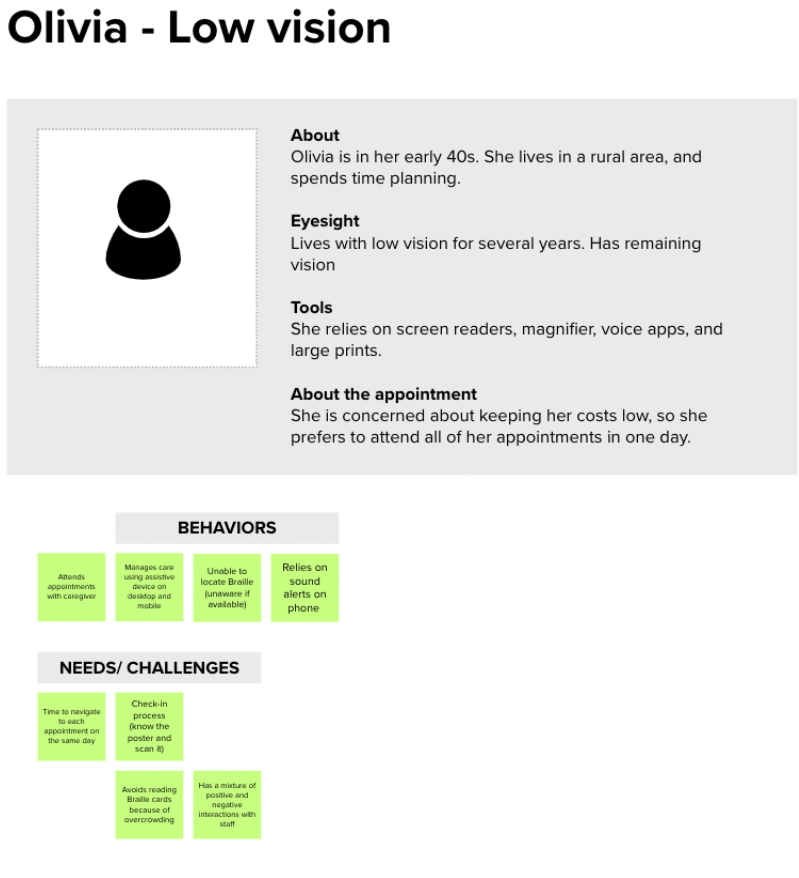
<p><img src="https://cdn-
images-1.medium.com/max/799/1*GXQWKpmeWZWcyamh308OuA.png" alt="A proto-persona example: Olivia, who lives with low vision for several
years. She is in her early 40s. She lives in a rural area and spends time
planning. She relies on screen readers, magnifier, voice apps, and large
prints. She is concerned about keeping her costs low, so she prefers to attend
all of her appointments in one day. Examples of Olivia's behaviors and needs
and challenges are provided in post-it notes, but are purposely not
legible." /> <em>Figure 4: Example
of a proto-persona for a Veteran living with low-vision. We used secondary
research sources to validate our assumptions on behaviors, needs and
challenges. Details of the post-it notes are intentionally not-visible, and
are shown for example purposes only.</em></p>

<h3 id="step-2-created-user-journey-maps-to-identify-pain-points-and-possible-solutions">Step 2: Created user journey maps to identify pain points and possible solutions</h3>

<p>Based on the proto-personas, we created user journey maps across the medical
appointment experience:</p>

<ul>
  <li>Before checking into an appointment</li>
  <li>During the appointment, and;</li>
  <li>After the appointment</li>
</ul>

<p>We proposed solutions to help address pain points across the journey for each
type of disability.</p>

<p><img src="https://cdn-
images-1.medium.com/max/1024/1*q1pVA7nHUfRTp1gd5oTWlA.png" alt="Example of user journey map for a Veteran with a low-vision disability. The
X axis lists user behaviors: actions, thoughts, pain points, touchpoints,
feelings, opportunities. The Y axis lists phases of the check-in experience:
before visit, before arrival, check-in on day of appointment, during the
appointment, the following appointment, after visit. Purple, green and blue
post-it notes appear along the map. The text is intentionally not visible as
this is for example purposes only." /> <em>Figure 5: Example
of user journey map for a Veteran living with low vision and may need
caregiver support to prepare for the medical appointment. Details of the post-
it notes are intentionally not-visible, and are shown for example purposes
only.</em></p>

<h3 id="step-3-mapped-each-solution-across-multiple-disability-types-creating-our-accessibility-use-case-map">Step 3: Mapped each solution across multiple disability types, creating our accessibility use case map</h3>

<p>But what might benefit someone with one type of disability, might be a barrier
for others. For instance, text-to-speech software is helpful for a blind
Veteran trying to access their appointments. But it may be inaccessible to a
Veteran who is hard of hearing.</p>

<p>Due to this challenge, we decided to map each proposed solution across the 9
most common disabilities affecting Veterans.</p>

<p>We listed recommendations along the x-axis. We then listed the nine
disabilities along the y-axis.</p>

<p>For each type of disability, we assessed if the solution was:</p>

<ul>
  <li>Impactful (positive and we believe will enhance the experience for this disability)</li>
  <li>Helpful (positive and it's not specific to this disability)</li>
  <li>It Depends (it may depend on the degree or type of disability, or the recommendation is too complex for us to weigh in at this point)</li>
  <li>Not Relevant</li>
  <li>Inaccessible (it's a barrier for a person with this disability)</li>
</ul>

<h3 id="step-4-iterated-with-various-accessibility-experts">Step 4: Iterated with various accessibility experts</h3>

<p>Time constraints didn't allow us to validate with users (which would've been
ideal). Instead, we iterated on our map with various accessibility
specialists:</p>

<ul>
  <li>Josh Kim (Accessibility Designer)</li>
  <li>Martha Wilkes ( Accessibility Strategist at the VA Office of the Chief Technology Office)</li>
  <li>Melissa Manak (Senior User Experience Mobile Designer)</li>
  <li>Angela Fowler (Senior A11Y Specialist and Designer)</li>
  <li>Vanessa Luxen (an IAAP certified professional and former Audiologist at CivicActions)</li>
</ul>

<p>Some of the experts we consulted also lived with a disability. This helped
ensure we were including the lived experiences of the very people we were
designing for.</p>

<h3 id="step-5-developed-an-accessibility-impact-score-for-each-recommendation">Step 5: Developed an "Accessibility Impact Score" for each recommendation.</h3>

<p>Working with our accessibility experts, we assigned a value depending on how
helpful or unhelpful the solution was for each type of disability. We called
this our "Accessibility Impact Score."</p>

<ul>
  <li>3 for Impactful (positive and we believe will enhance the experience for this disability)</li>
  <li>2 for Helpful (positive and it is not specific to this disability)</li>
  <li>1 for It Depends (it may depend on the degree of type of disability, or the recommendation is too complex for us to weigh in at this point)</li>
  <li>0 for Not Relevant</li>
  <li>-2 for Inaccessible (it is a barrier for a person with this disability)</li>
</ul>

<p>We then tallied the number of scores for each solution to calculate the final
"Accessibility Impact Score."</p>

<p>This helped us assign a numerical value to evaluate the impact each
recommendation would have across multiple disabilities. For instance,
improvements like "sending an SMS notification with a link to pre-check-in"
was one of our highest impact solutions. This meant it was impactful for the
greatest number of disabilities.</p>

<h3 id="step-6-prioritized-recommendations-based-on-the-accessibility-impact-score">Step 6: Prioritized recommendations based on the Accessibility Impact Score</h3>

<p>Using a prioritization matrix, we prioritized each recommendation based on its
total Accessibility Impact Score.</p>

<p>We refined it further with our product team based on scope and feasibility, so
we could eventually choose the recommendations we wanted on our roadmap.</p>

<h3 id="we-took-some-risks-and-made-many-assumptions">We took some risks and made many assumptions</h3>

<p>There are many caveats with our framework, for instance:</p>

<ul>
  <li>It favors specific solutions that are impactful for a few disabilities and may end up with a lower score vs. general solutions that help a variety of disabilities.</li>
  <li>We did not capture the complexity within each disability type. For example, cognitive disabilities can include a range of disabilities that vary in severity, symptoms and more. We recognize disabilities are not a monolith and the experiences are complex and varied.</li>
  <li>It doesn't take user preferences or familiarity with the technology into account</li>
  <li>It's not intersectional — it doesn't consider people who live with more than one disability</li>
  <li>We didn't test it with users living with disabilities.</li>
</ul>

<blockquote>
  <p>This is our first attempt at designing for disabled Veterans when resources
are limited, time-frames are tight, and priorities conflict.</p>
</blockquote>

<h4 id="ideally-disabled-veterans-would-be-part-of-our-process">Ideally, disabled Veterans would be part of our process</h4>

<p>What would we have done differently without those constraints? We would have
included disabled Veterans throughout all six steps of the process. This way
we'd design <em>with</em> (not <em>for</em> ) the disabled Veteran community.</p>

<h3 id="whats-next">What's next?</h3>

<p>This framework is dynamic. We plan to continue to iterate as we address our
many assumptions. We hope to start conducting user research sessions with
Veterans living with disabilities to validate (and invalidate) our proposed
improvements.</p>

<p><em>Authors: Nira Datta, Senior Content Designer at CivicActions; Ya-ching Tsao,
Product Designer at CivicActions</em></p>

<p><img src="https://medium.com/_/stat?event=post.clientViewed&amp;referrerSource=full_rss&amp;postId=8a1dff130b37" alt="" /></p>

<hr />

<p><a href="https://medium.com/civicactions/helping-disabled-veterans-check-in-
designing-an-accessibility-map-8a1dff130b37">Helping disabled Veterans Check-In: Designing an Accessibility
Map</a> was originally published in
<a href="https://medium.com/civicactions">CivicActions</a> on Medium, where people are
continuing the conversation by highlighting and responding to this story.</p>]]></content><author><name>nira-datta</name></author><summary type="html"><![CDATA[A note on language: We're using both people-first language ("a person with a disability") and identity-first language ("disabled person"). We recognize both are valid and advocated for within the disability community.]]></summary></entry><entry><title type="html">Opensource.com: How I do automated accessibility testing for my website</title><link href="https://accessibility.civicactions.com/posts/opensource-automated-accessibility-testing" rel="alternate" type="text/html" title="Opensource.com: How I do automated accessibility testing for my website" /><published>2023-03-02T16:00:00+00:00</published><updated>2023-03-02T16:00:00+00:00</updated><id>https://accessibility.civicactions.com/posts/opensource-automated-accessibility-testing</id><content type="html" xml:base="https://accessibility.civicactions.com/posts/opensource-automated-accessibility-testing"><![CDATA[<p><em>Opensource.com</em> published a guest editorial we wrote automated accessibility testing and how it is done on GitLab using Pa11y CI and Cypress.</p>

<p>Full post: <a href="https://opensource.com/article/23/2/automated-accessibility-testing">How I do automated accessibility testing for my website</a></p>]]></content><author><name>daniel-mundra</name></author><category term="Testing" /><summary type="html"><![CDATA[Opensource published a guest editorial we wrote on automated accessibility testing.]]></summary><media:thumbnail xmlns:media="http://search.yahoo.com/mrss/" url="https://accessibility.civicactions.com/card-power.png" /><media:content medium="image" url="https://accessibility.civicactions.com/card-power.png" xmlns:media="http://search.yahoo.com/mrss/" /></entry></feed>